Professional photo editing standard
Adobe Photoshop CC has long been the preferred choice for creative professionals and hobbyists needing photo editing, graphic design, and multimedia tools. This photo editing application offers advanced options for image adjustments, retouching, compositing, and detailed artwork, making it versatile for professional and personal projects.
Adobe Photoshop CC also excels in creative workflows, providing precise control over layers, selections, and effects. The game features cloud integration for collaboration, asset syncing, and team projects. Its customizability, responsive tools, and compatibility with standard file formats make it ideal for photography, web, and print projects alike.
Deep tools, expert capabilities
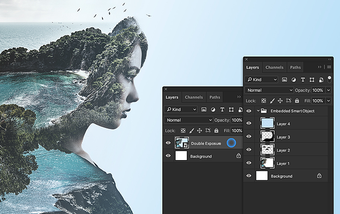
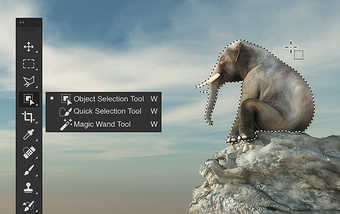
Adobe Photoshop CC excels with a comprehensive set of editing features that give creators granular control over images. Users benefit from layer‑based workflows, advanced selection tools, retouching brushes, and masking options that support high‑end photo manipulation. Even so, the program’s vast array of features can feel overwhelming for new users, as mastering all tools and techniques requires patience, practice, and gradual exploration to achieve professional-quality results.
Performance in the program is generally reliable when handling medium-sized files and standard editing tasks, providing smooth real-time previews and export routines. However, complex projects with many layers, high-resolution images, or intricate adjustments can occasionally slow down, particularly on systems with limited memory. While the program performs well overall, very large projects may require extra processing time to maintain efficient workflows.
The tool maintains excellent compatibility with industry-standard file formats, making it easy to share work with clients, collaborators, and team members. Its professional polish, extensive plugin support, and integration with shared asset libraries strengthen its overall utility. On the downside, some advanced workflows involve a steep learning curve and demand high system resources, which may challenge casual users or those on less powerful machines.
AI-powered creative enhancements with Firefly
Recent updates to Adobe Photoshop CC introduce powerful generative AI features powered by Adobe Firefly that significantly boost creative capabilities. These include improved Generative Fill and Generative Expand tools that let users quickly create or revise complex image elements with realistic results using simple prompts. You can now tweak backgrounds, generate image variations, and even control texture and style with AI assistance, accelerating workflows for artists at every skill level. Such AI-driven tools are part of Adobe’s broader push to embed commercially safe, generative models directly into core creative apps.
Projects and collaboration tools
Adobe has introduced a new Projects (beta) feature in Photoshop that simplifies organizing and collaborating on creative work. This addition allows you to group assets, layers, and files into a shared space, reducing the need to juggle multiple folders or local drives. Projects help smooth teamwork and client workflows by keeping everything in one place, making it easier to present consistent versions and avoid confusion over file changes—especially useful for multi-layered campaigns or collaborative artistic briefs.
Expanded Creative Cloud Pro benefits
With the evolution of Creative Cloud Pro, Photoshop users now get access to a broader suite of performance and workflow enhancements across Creative Cloud apps. Subscribers receive features such as more than 30,000 fonts, unlimited library storage, and millions of high-resolution stock assets that can jumpstart creative work. Additionally, performance upgrades across apps—including faster selection, refined masking, and improved integration with Lightroom and Adobe Express—help streamline everyday tasks and boost productivity.
Photoshop comes to mobile and the web
Adobe recently expanded Photoshop beyond desktop with new mobile and web versions designed to bring powerful image editing tools to phones and browsers. These versions include core Photoshop functionality such as layering, masking, precise selections, and headline features like Firefly-powered generative editing, allowing creators to start and continue projects on the go. This cross-platform flexibility is ideal for artists who need to work seamlessly between desktop, mobile, and browser environments, expanding where and how creative work can be done.
Still a creative powerhouse
Adobe Photoshop CC remains a dependable choice for users who need professional photo editing, deep creative control, and broad format support. The game offers unmatched flexibility for image adjustments, design work, and creative tasks, though its complexity and hardware demands can challenge beginners or casual users. For serious creators and professionals, the tool continues to deliver powerful capabilities and consistent results across diverse multimedia projects.

















.png)