

A powerful image editor
Adobe Photoshop, or Photoshop, is an industry-leading image editing software for artists, photographers, and graphic designers all over the world. Widely regarded as the standard in graphic design, it is the go-to software for everyone looking to unleash their creative potential on their device.
With an intuitive and improved user interface and a wide range of basic and advanced tools, Photoshop continues to be the standard in the digital editing field. Seamlessly integrated into the Creative Cloud suite, it comes with a free seven-day trial period that allows users to explore all its features before fully committing to the program.
What are the features of Adobe Photoshop?
Photoshop includes a wide array of tools and features to cater to all your image editing needs. These are the most noteworthy ones:
- Drawing Tools- Photoshop includes all the tools and functions—such as the pen, pencil, and brush tools—to create digital illustrations.
- Image Retouching and Correction Tools- The program allows you to leverage its basic and advanced functions to edit and correct any image. From the Spot Healing Brush to remove blemishes and imperfections to the Clone Stamp for removing distractions, objects, or any unwanted elements—enhancing photographs was never easier.
- Tone and Color Adjustments- The software gives you complete control and precision to adjust your images' brightness, contrast, and saturation.
- Layers and Layer Masks- Layers and masks not only enable you to add details and effects to an image, but also rename your layers to help streamline your workflow.
- Video Editing- Photoshop includes basic video editing tools such as cutting and merging clips, as well as the ability to add text and visual effects to your recordings.
- Create Custom Actions- Improve your workflow and performance with Photoshop's automation and script customization system.
- RAW File Support- Similar to Adobe Photoshop Lightroom, you can open and edit RAW files directly within the program.
Boasts a clean interface
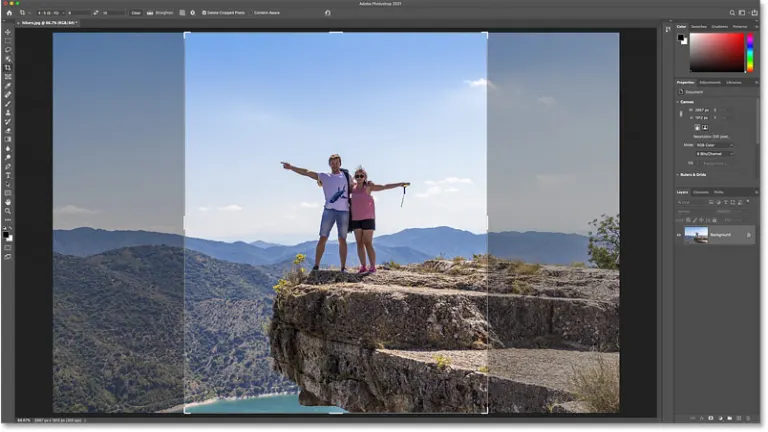
One of the undeniable strengths of Adobe Photoshop is its clean and intuitive user interface. It consists of three main parts: the workspace and the panels where you can select all its tools and a small box to manage the layers. The program also comes with the Creative Cloud library, allowing you to access all projects and assets you’ve uploaded to Adobe’s cloud service from any device.
The arrangement of the screen panels is entirely customizable, enabling every user to create a workspace tailored to their specific needs. It’s important to point out, however, that the aesthetics, menu bar, and keyboard shortcuts have been adapted to the Apple ecosystem, making it the perfect choice for any Mac user.
For your artistic and productivity needs
Adobe Photoshop offers various tools that can increase your productivity. The user-friendly home screen lets you quickly create a new project or start from the point you left off. Moreover, the software comes with an auto-commit feature that enables you to crop or apply any changes to your work without having to click on the Return button or the Commit option. Apart from these basic tools, the software provides users with the ability to transform pixels, bitmaps, layers, and smart objects while preserving their proportions.
Another feature is the Paint Symmetry tool, which lets users create several brush lines at once to get symmetrical results. The tool works for layer masks, as well as for Eraser, Paint Brush, and Pencil tools. Consisting of Radial and Mandala symmetry modes, you can produce beautiful, well-designed symmetrical patterns that will surely catch the eye of any individual.
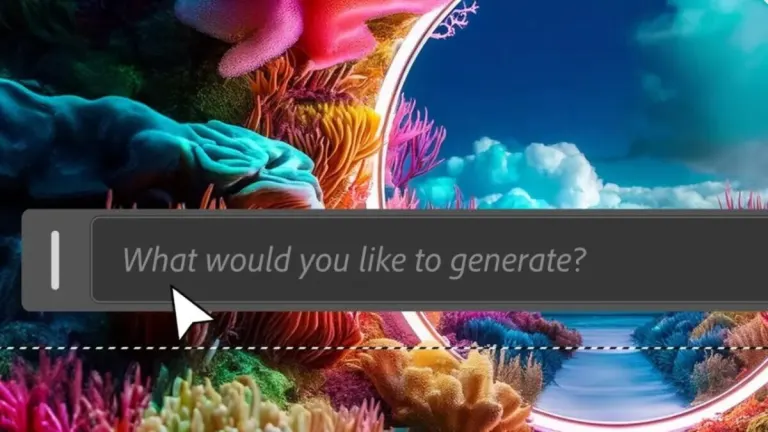
In addition, the program boasts Adobe Firefly’s AI-powered Generative Fill for further refining your projects with generated elements. To generate an image, define an area or select an object in an image using the Selection tool and go to the Contextual Task Bar where you’ll find the Generative Fill option. Click this option and type your text prompt. Once done, select “Generate” and the program will display previews of generated content.
As with most AI tools, refining your text prompt as you deem fit will allow for better image generation. If you don’t type anything in the text box, the program will generate an element for you. When using this software on Mac computers, you don’t need to change tools for editing text—you can double-click on the text layer and quickly make the desired changes. Similarly, you can see different blend modes on your image by scrolling over them. In addition, it offers a Color Wheel, allowing users to visualize and choose from a range of options.
What is the best Photoshop for beginners?
With a steep learning curve and an array of tools at the user’s disposal, Adobe Photoshop can be overwhelming for newbies. Thankfully, Adobe has released a photo-editing software that is suitable for beginners, and it’s called Adobe Photoshop Elements. While the tool isn’t as comprehensive as Photoshop, it does offer some great design elements. It also doesn’t operate on a subscription basis, and you can download the full version of the tool for free until the end of the 30-day trial period.
Create professional works of art
With a comprehensive set of tools, Adobe Photoshop is the most powerful and versatile image editing software in the market. Seamlessly integrated into the Apple ecosystem and always offering professional results, it stands as the ultimate creative tool for any artist or photographer. Even though there are popular alternatives such as Affinity Photo, this software remains the go-to choice for anyone seeking to make a name for themselves in the industry.





.webp)

.webp)










User reviews about Adobe Photoshop
by hola
nice
by hola
good
by varkha sadhwani
I had a really good experience. I always go for Softonic without any second thought
by Onakoya Omotola
to edit picture and some other things related to i also want to use it to turn my picture to cartoon
by satriyamahar dika
awesome apps so friendly user for me and my student to study design
by kushal acharya
i am very happy softonic websites.softic provied free and paid version software its really help me